Post 2 min read
Writing Colemak on a Mechanical Keyboard
My transition to writing almost exclusively on a 60% mechanical keyboard (Anne Pro 2) mapped with the Colemak layout is complete 🥰
Here are some things I wouldn’t want to miss and weren’t immediately obvious to me, so maybe they’re helpful to somebody else, too.
- Removing the right
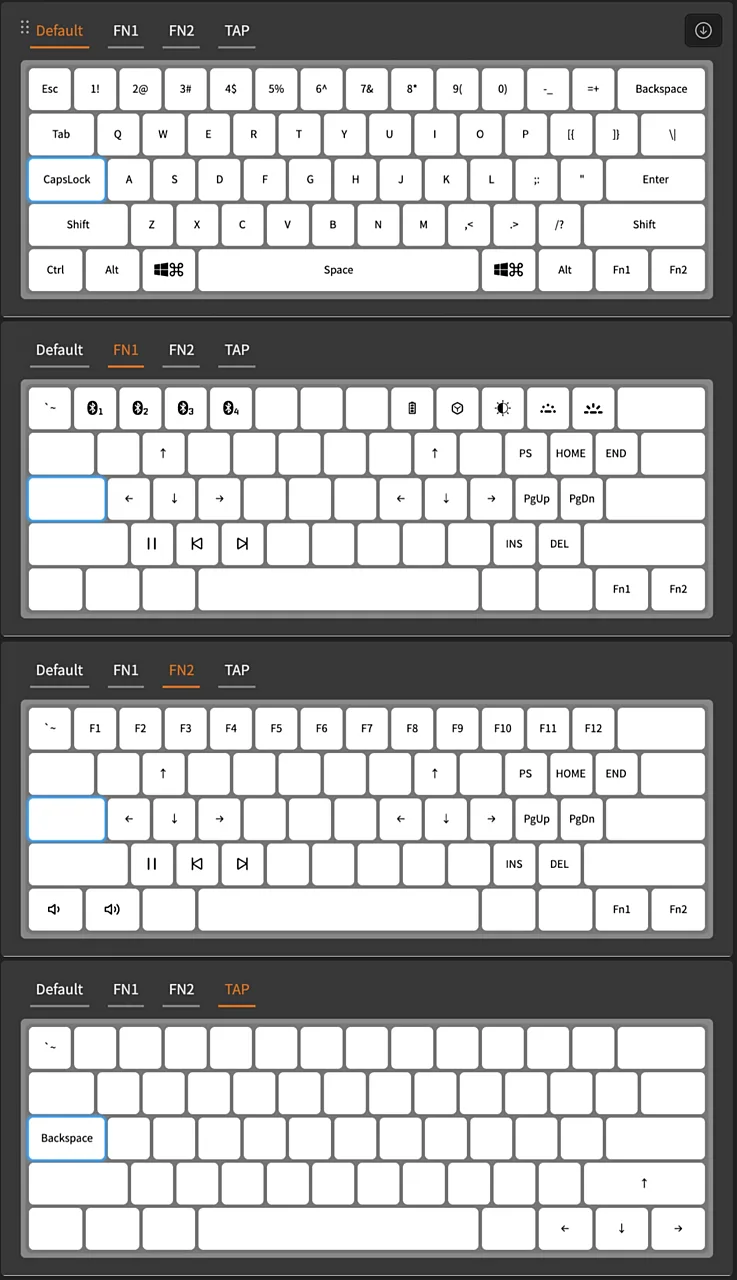
ctrlkey in favor of a 2ndcmdkey is a good idea when working on MacOS, where cmd is way more common thanctrl. - Tap mapping is genius. It allows you to let certain keys behave differently when hit shorter than a configurable threshold. (I’ve set the sensitivity to <150 ms and never looked back)
- Having
CapsLockasMagic Fn2and as a second backspace on short tap is a game changer to accessFn2functions on the right side while still having easy access to backspace on the left. - Having
Escapework asbacktick/tildeon short tap is a must. - Making
F1-F12accessible withFn2instead of Fn1 makes it more convenient to control volume and brightness (on Mac) because I movedFn2to the edge. - Using dead keys for German umlauts is nicer than anticipated.
- It’s better to not reprogram the layout to Colemak. Because if you do so, you’ll need to switch layouts on the OS level every time you use another keyboard that has not been reprogrammed. (Such a pain if you’re on a laptop and need to login using the wrong layout)
- Applies to both Colemak and US layout, but coming from a German layout, this is a huge shift: writing code is way more ergonomic with the special character placement. That alone is well worth the time